Decoupage Digital Papers: Elevating Your Craft with Precision and Quality
There is a distinct satisfaction in finding the perfect texture for a creative project, especially when that texture bridges the gap between vintage charm and modern convenience. Decoupage digital papers have transformed how crafters, designers, and small business owners approach surface decoration. Unlike traditional physical papers that require soaking, gluing, and careful smoothing to avoid bubbles, digital alternatives offer immediate versatility. These assets are specifically designed to mimic the intricate, layered look of classic decoupage while providing the clean, high-resolution foundation necessary for professional-grade scrapbooking, card designs, and graphic projects.
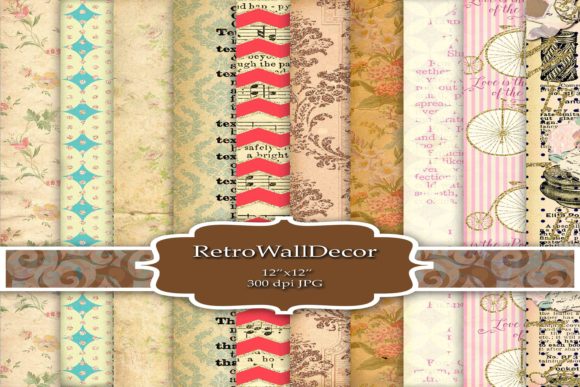
However, the transition from physical to digital media often leads to overlooked technical details. Many creators assume all downloadable backgrounds are created equal, leading to frustration when a file that looked beautiful on a screen appears pixelated in print or lacks the depth required for realistic layering. Understanding the specific characteristics of high-quality decoupage assets is essential for avoiding wasted time and subpar results. When you work with a curated collection of 11 high-quality 300 DPI 12x12 JPEG files at 3600x3600 pixels, you are working with a professional standard that demands proper handling to truly shine.
The Resolution Reality Check
The most frequent mistake beginners and even some intermediate users make is ignoring the relationship between pixel dimensions and print size. In the world of digital paper, "high resolution" is not just a marketing buzzword; it is a mathematical requirement for clarity. A common pitfall involves using web-optimized images (often 72 DPI) for physical crafts. While these files load quickly online, they lack the data density required for crisp printing. When stretched to fit a 12x12 scrapbook page, low-resolution files become blurry and artifact-heavy, ruining the illusion of delicate damask patterns or fine floral details.
To avoid this, always verify that your decoupage digital papers are natively 3600x3600 pixels at 300 DPI. This specification ensures that when printed at actual size, every brushstroke and texture remains sharp. If you are designing for larger formats or plan to zoom in significantly during digital editing, this resolution provides the necessary headroom. Conversely, if you only need these assets for web graphics or social media posts, understand that you are working with master files. Downscaling them for web use preserves quality, whereas upscaling lower-quality files never yields professional results. Always start with the highest quality source and work downward rather than trying to salvage inadequate assets.
Understanding File Format Limitations
JPEG is the industry standard for digital scrapbooking and decoupage papers due to its balance of color fidelity and file manageability, but it comes with inherent limitations that users must navigate. A common misunderstanding is treating JPEGs as if they support transparency. Unlike PNG files, JPEGs do not have an alpha channel. If you attempt to erase a background or isolate a floral element within a standard JPEG decoupage paper, you will be left with a white box rather than a transparent edge.
This does not mean JPEGs are inferior for this purpose; it simply means they serve a different function. For full-page backgrounds, card bases, and matting layers, JPEG is ideal because it handles complex gradients and textures efficiently without the massive file sizes associated with uncompressed formats. However, if your workflow requires extracting individual elements from the paper, you must be prepared to use masking tools or selection wands in your editing software. Recognizing this distinction early prevents workflow bottlenecks. Use these 12x12 JPEGs as foundational layers and complementary textures, and pair them with PNG elements if you need isolated cutouts. Trying to force a format to do something it wasn't designed for is a primary cause of inefficient editing sessions.
Color Management and Print Consistency
Digital screens emit light, while paper reflects it. This fundamental difference explains why vibrant damask patterns or soft floral hues often look duller or shifted when printed. Many creators blame the paper quality when the issue actually lies in color profile mismatches. Most digital papers are created in RGB color space for screen viewing, but home and commercial printers typically operate in CMYK. Without proper color management, the rich reds in a vintage floral design may print as muddy browns, or bright blues may appear purple.
Before committing to a large print run or finalizing a client project, perform test prints. Calibrate your monitor if possible, or at least understand its bias. When using high-quality 300 DPI decoupage papers, utilize printer-specific ICC profiles to bridge the gap between what you see and what you get. Additionally, consider the substrate. Printing intricate decoupage designs on glossy photo paper yields vastly different results than on matte cardstock or textured linen paper. The absorption rate of the paper affects color saturation and detail visibility. Matching your digital asset to the appropriate physical medium is just as important as the resolution of the file itself.
Licensing and Commercial Viability
For entrepreneurs, marketers, and freelancers, the aesthetic appeal of decoupage digital papers is secondary to their legal usability. A critical error in the digital crafting community is assuming that purchasing a file grants unlimited rights. Licensing terms vary significantly between personal use, limited commercial use, and extended commercial licenses. Using a personally licensed damask background for a product package or a monetized blog template can lead to copyright infringement issues and reputational damage.
Always read the Terms of Use before integrating any asset into a revenue-generating project. High-quality collections often come with clear licensing tiers. If you are creating physical products like greeting cards or journals for sale, ensure your license covers physical end products. If you are incorporating the paper into digital templates for resale, verify that flattening or securing the image is required to protect the original asset. Respecting intellectual property not only keeps you legally safe but also supports the artists who create these specialized resources. Ethical usage is a cornerstone of sustainable creative business practices.
Maximizing Versatility Through Layering
Finally, many users underutilize their digital papers by treating them as static, single-use backgrounds. True value emerges when you leverage the 11-file variety to create depth. Decoupage is inherently about layering, and digital workflows should mirror this. Instead of placing a single floral paper down and adding text, experiment with blending modes. Overlaying a subtle damask texture onto a solid color base using "Multiply" or "Soft Light" creates custom backgrounds that feel organic and unique.
Use the variation within a cohesive collection to maintain thematic consistency across a project series. For example, use a bold floral pattern for a scrapbook cover, a coordinating lighter texture for journaling cards, and a subtle damask for envelope liners. This systematic approach maximizes the return on investment for your digital assets. By understanding the technical specifications, respecting format constraints, managing color accurately, adhering to licensing, and employing advanced layering techniques, you transform simple JPEG files into powerful tools for professional expression. The goal is not just to use digital paper, but to master it so thoroughly that the digital origin becomes invisible, leaving only the beauty of the finished creation.